
In December 2023, I published an article in Spanish called “Interactuando con la IA: ¿Cómo Mejoré Mis Prompts?”—roughly, “Working with AI: How I Improved My Prompts.” At the time, I was writing about GPT-3.5, BARD, and Bing. Prompting felt like a new practical skill: learning how to phrase instructions so an AI system would give you better answers.
The core idea was not wrong. If you explain your request better, the model usually has a better chance of helping you well. What I would change today is the center of gravity. After several years of working with far more capable models, files, search, code, tools, and agents, I would not begin by teaching someone how to craft the “perfect prompt.” I would start somewhere more durable. The real skill is working with AI as a process of communication, review, and refinement.
Most of the time, the missing ingredient is not a special phrase. It is information that you know about the task and the model does not—because you have not given it that information.
A prompt is not an incantation
For a while, formulas such as “Act as an expert in…” or “You are a senior specialist in…” became almost synonymous with prompt engineering. A role can be useful; current guidance from Anthropic and Google still treats roles or system instructions as valid ways to steer perspective, tone, and behavior. But a role cannot replace context, and it does not turn an underspecified request into a well-defined task.
Imagine asking a capable colleague, “Make me a presentation.” They would probably ask questions. Who is it for? What should the audience understand? How much time do you have? Which information is available? What kind of presentation do you expect? Now compare that with: “I need to present this project to a non-technical client. I have ten minutes. I want them to understand the problem, our proposed approach, and the next steps. Give me six slides with very little text.”
The second request is not better because it contains special wording. It simply leaves fewer important decisions to guesswork. That is also where current guidance from OpenAI, Anthropic, and Google tends to converge: be clear, provide relevant context, describe the output you want, and use examples when examples can communicate the target better than more instructions.
Tell the AI what you want—and what “good” means
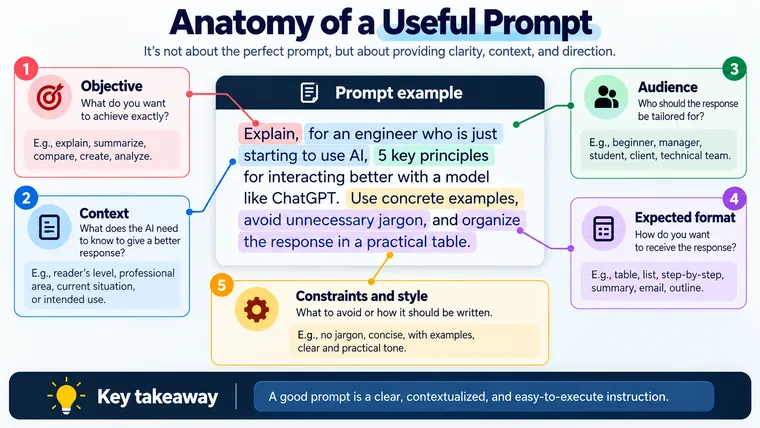
A useful request often answers a few basic questions: What am I trying to achieve? What does the model need to know? Which constraints matter? What should the result look like? What would make me reject the answer even if it sounds polished?
This does not mean every prompt should become a template. If you ask for 18 percent of 450, five paragraphs of context would only make the interaction worse. But once a task contains judgment, audience, tradeoffs, or constraints, context stops being decoration and becomes part of the problem.
“Write an email asking for a job interview” may produce something acceptable. It becomes a different task when you explain that you have already spoken with the recruiter and that the role is in engineering. You also want a professional but human tone, you do not want to exaggerate experience you do not have, and the email should fit on one screen. You are no longer searching for a sophisticated prompt; you are making your criteria explicit.
The distinction matters because the model can infer your intention, but inference is not the same as knowing it.
When you do not know what context to provide, ask
One idea from my 2023 article is still worth keeping, although I would use it differently today. I used to recommend asking the AI, “What should the prompt be for…?” That was useful because it let the model help structure a request I did not yet know how to structure.
Today I would make the interaction more direct: “I want this result. Before doing the task, tell me what important information is missing and ask me the questions you need.” The conversation now completes the brief before the model attempts the final deliverable.
Suppose you want to tailor your résumé to a job posting but you are not sure what matters. You might write:
I want to adapt my résumé to this role without inventing experience. I will give you the job description and my current résumé. Before rewriting anything, identify what information is missing, which requirements appear important, and which points you need me to verify.
Now the first response is not the final deliverable. It is a step that improves the problem before the model attempts to solve it. For a beginner, that is a powerful shift: you do not have to get everything right in the first message.
A good conversation usually beats a heroic first prompt
OpenAI describes iterative refinement as a general prompting practice; Google similarly presents prompt design as a process of defining objectives, testing outputs, and refining what you provide. This is close to something I had already discovered in 2023 when I recommended using multiple prompts for complex work.
What changed is how I think about that idea. I no longer see it merely as “split one large prompt into several smaller prompts.” I see a loop:
ask → inspect → find what is missing → correct → ask again.
If the first answer drifts, you do not need to restart every time. Tell the model what was useful, what was wrong, which assumption failed, or which criterion was missing. Your correction becomes additional context.
For complex tasks, it is often useful to separate planning from execution. Before asking an AI system to produce twenty pages, modify a large codebase, or design an entire solution, you can ask it to restate the objective, list assumptions, identify missing information, and propose a plan. The value is not in a ritual phrase such as “confirm that you understand.” The value is that assumptions become visible while they are still cheap to correct.
Sometimes an example is worth more than another paragraph of instructions
“Talking to AI” no longer means typing text into an empty box. Depending on the product, you may be able to provide documents, screenshots, images, audio, tables, code, or links. Current OpenAI, Anthropic, and Google guidance also emphasizes examples as an effective way to steer format, tone, and structure.
If you want a report to follow a certain pattern, showing a strong example may work better than spending fifteen lines describing every section. If you want help analyzing a spreadsheet, sharing the spreadsheet is better than reconstructing it from memory. If something looks wrong in an interface, a screenshot can remove several rounds of explanation.
A useful rule is simple: if you already have the context, provide it; if you already have a good example, show it. Do not make the model reconstruct information you could have supplied directly.
A confident answer can still be wrong
This is one part of the original article that I would emphasize much more today. AI can be fast, useful, and remarkably capable. None of that makes it infallible.
OpenAI currently warns that ChatGPT can produce incorrect or misleading information and can sound confident while being wrong. NIST uses the term confabulation for false or erroneous content that a generative system may present confidently. The models have improved enormously since 2023, but the need for verification did not disappear with those improvements.
Your verification effort should grow with the consequences of the answer. For brainstorming, reading and choosing may be enough. For a date, citation, regulation, technical claim, calculation, financial decision, or production code change, you may need the original source, the underlying data, an appropriate tool, or an objective test.
You can ask the AI to search for sources, separate facts from assumptions, or flag uncertainty. Those are useful behaviors. But important verification should not collapse into asking the same system whether its previous answer was correct.
A simple way to start today
If you are new to this and do not know what to type, you do not need a library of one hundred prompts. Start with something like this:
I want [result]. The important context is [context]. Please respect [constraints or criteria]. Give me the result as [format]. If important information is missing, ask me before making assumptions.
For example:
I want to understand this technical report without losing its important ideas. I am an engineer, but not a specialist in this topic. Explain it in clear language, keep technical terms when they are necessary, and organize the answer into: main idea, concepts I need to understand, risks, and questions I should investigate next. If a conclusion is not supported by the document, say so instead of filling the gap yourself.
That simple request already contains much of what matters: objective, context, criteria, output, and a boundary for unsupported assumptions. Then comes the part no prompt template can do for you: read the answer and decide whether it is actually useful.
From better prompts to better collaboration
If I had to summarize what changed since that 2023 article, I would say that improving the prompt was only the first rung of the ladder. The next step was learning to provide context; then to work in stages, review assumptions, use examples, bring in tools, and verify results. At higher levels, the same discipline eventually becomes specifications, tests, workflows, and agents.
You do not need to begin there. If you are just starting with AI, begin with something simpler: make your goal visible and share what the other side needs to know. Define what a useful result looks like; then treat the first answer as the beginning of the conversation rather than a verdict.
Do not hunt for a special sentence that forces the model to understand you. Make your intention visible, improve the context, and keep your judgment in the loop. That skill will remain useful even as the models, interfaces, and vocabulary around AI continue to change.
References
- OpenAI, Prompt engineering best practices for ChatGPT: https://help.openai.com/en/articles/10032626-prompt-engineering-best-practices-for-chatgpt
- OpenAI, Best practices for prompt engineering with the OpenAI API: https://help.openai.com/en/articles/6654000-best-practices-for-prompt-engineering-with-the-openai-api
- Anthropic, Prompting best practices: https://docs.anthropic.com/en/docs/build-with-claude/prompt-engineering/prompt-templates-and-variables
- Google Cloud, Overview of prompting strategies: https://cloud.google.com/vertex-ai/generative-ai/docs/learn/prompts/prompt-design-strategies
- OpenAI, Does ChatGPT tell the truth?: https://help.openai.com/en/articles/8313428-does-chatgpt-tell-the-truth
- NIST, Artificial Intelligence Risk Management Framework: Generative Artificial Intelligence Profile (NIST AI 600-1): https://doi.org/10.6028/NIST.AI.600-1
This article updates “Interactuando con la IA: ¿Cómo Mejoré Mis Prompts?”, originally published on December 16, 2023.