Skip to content

COURSE · DATA VISUALIZATION

Técnicas de Visualización de Datos

Make a chart show the right story, not just the numbers

A visualization can contain accurate data and still be hard to understand. When chart choice, color, or presentation competes with the message, the audience has to work harder to discover what matters.

Técnicas de Visualización de Datos is a concise course designed to help you choose, review, and improve visualizations with clearer criteria. It combines fundamentals, applied examples, and concrete chart corrections so you can make data easier to follow when you present it.

The course itself is taught in Spanish.

3,567 students · 4.1/5 · 205 Udemy ratings

Data visible on Udemy on October 5, 2026.

View the course on Udemy

Técnicas de Visualización de Datos

The chart is not the goal. Understanding is.

Turning numbers into bars, lines, or colors is only the beginning. When you prepare a presentation, report, or spreadsheet, the important question is different: what does the person looking at these data need to notice first?

A good visual decision makes that reading easier because the chart matches the comparison, color directs attention, and elements that do not help stop competing with the main finding.

For example, a bar chart, a line chart, and a pie chart can all contain correct numbers while producing very different readings. The useful skill is choosing the form that most closely matches what you need to explain, because different comparisons call for different visual forms.

First define what the audience should understand. Then decide how to show it.

What will you work on?

Choose chart types with a reason

You will review bar charts, line charts, pie charts, and other formats to recognize which representation makes a comparison or change easier to read. The goal is not to memorize an endless list of rules, but to build criteria you can reuse.

Fix visualizations that make the reader work too hard

The course includes concrete chart examples that can be improved. For example, seeing what changes before and after a correction can help you notice similar problems in your own reports and presentations.

Use color with a purpose

Color can organize, emphasize, or distract. You will learn to treat it as a functional decision: if it is there, it should help the audience understand what matters.

Decide what story the data need to tell

Before choosing a chart, it helps to know what the audience should understand. The course connects visualization and narrative so the form supports the message instead of becoming decoration.

Bring that judgment into your own work

The course includes applied examples, a reference to Excel templates, and a chart-review checklist. To be clear, Excel appears as one practical resource; this is not an Excel course. The main focus is the judgment behind choosing and improving visualizations.

A short, direct learning path

According to the current listing, the course includes 4 sections, 20 lessons, and approximately 45 minutes of content. It begins with visualization fundamentals, moves through basic charts and concrete corrections, then expands into other chart types and the use of color.

No prior knowledge is required.

The format may fit if you want a clear introduction that helps you review charts more deliberately. If you need a long program, intensive exercise-based training, or deep instruction in one specific tool, review the syllabus before enrolling to make sure the format matches what you are looking for.

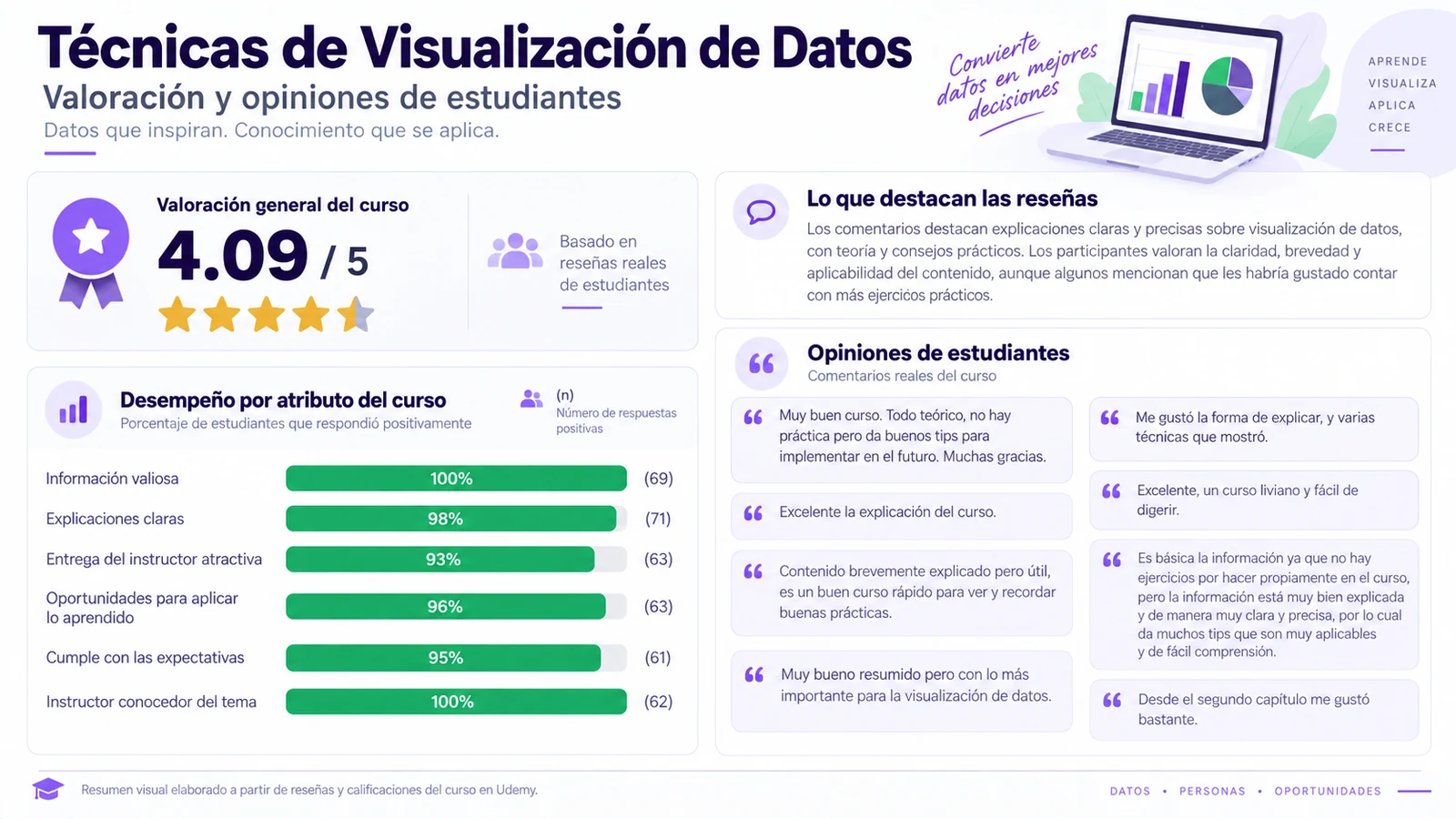
How have students rated the course?

These historical Udemy student responses reflect their views on clarity, content value, opportunities to apply what they learned, and knowledge of the subject.

Summary of student ratings and responses for Técnicas de Visualización de Datos
Historical student responses for the course.

Look at one of your charts for ten seconds

Take a visualization you already have and ask:

  • Is the main comparison clear without a long explanation?
  • Is color directing attention, or competing with the message?
  • Can you state in one sentence what should become clear after someone sees it?

If those questions reveal something you would change, you already have a glimpse of the kind of judgment the course develops.

Who may this course fit?

It is designed for people who work or study with data and need to present them more clearly; for people who prepare reports, spreadsheets, or presentations; and for people who already build charts but want better criteria for reviewing visual decisions.

It can also fit if you need a short foundation before you move into more specialized tools or disciplines.

This format may not be right if you are looking for extensive training, a course centered entirely on one tool, or long exercise-based sessions. Before enrolling, review the syllabus and compare it with what you need.

One rule worth remembering

What matters is not adding more to the chart. It is making the important information easier to see.

When you review a visualization, use that rule as a filter: remove what distracts, choose a form that matches the comparison, use color for a reason, and decide what the audience should notice first.

Message first. Chart second.

Make your next visualization easier to understand

If you want a concise, practical way to decide what to show, what to remove, what to emphasize, and what should become clear, you can review the syllabus, preview lessons, and current terms directly on Udemy.

View Técnicas de Visualización de Datos on Udemy

Opening the link takes you to Udemy, where you can review the full syllabus, preview lessons, current price, and terms before enrolling. Access, billing, purchase or subscription options, commercial terms, cancellation or refund conditions, privacy, and support are handled by Udemy. Studios216 does not set those terms.